Last updated: 31 October 2026
In short
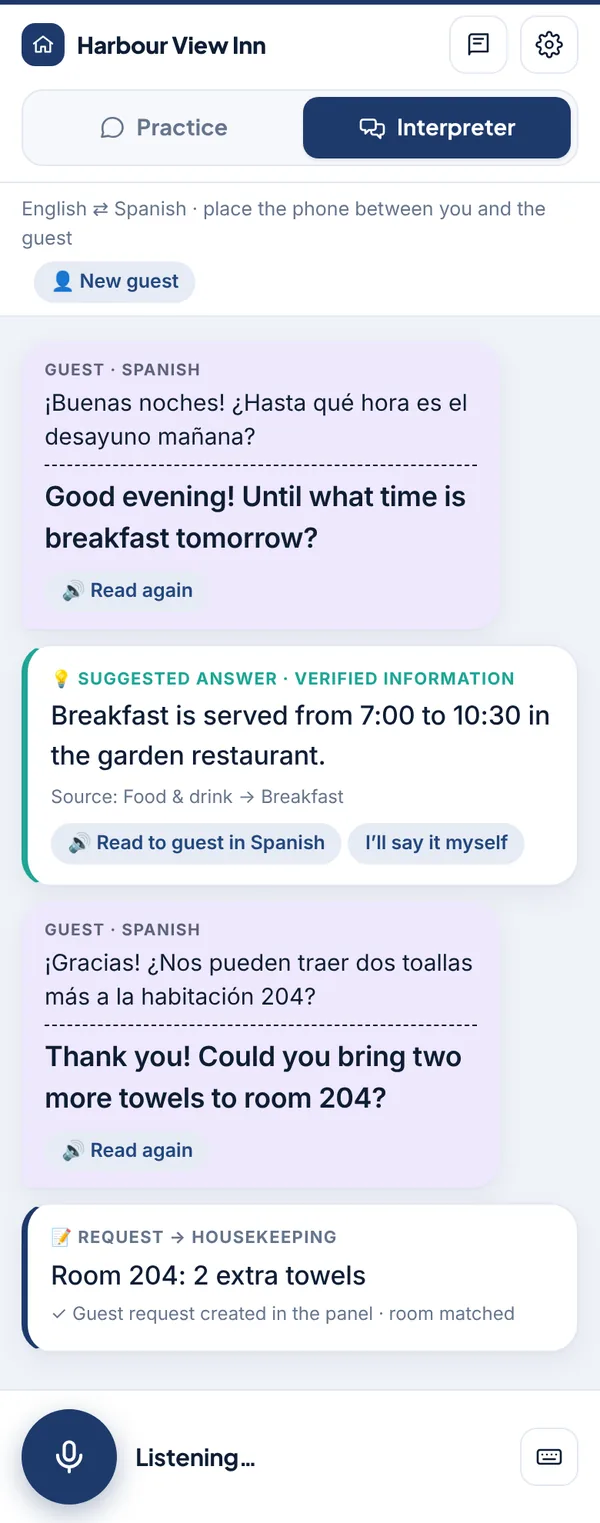
- Hands-free live translation. You turn the microphone on once; after that the guest and your staff simply take turns. The app notices when someone stops talking, recognizes the language, translates and reads it aloud in the other language. Both languages stay on screen.
- 17 languages. Turkish, English, German, Russian, Arabic, French, Spanish, Italian, Polish, Ukrainian, Dutch, Romanian, Czech, Slovak, Lithuanian, Danish and Persian.
- Suggested answers from verified information. When a guest asks "What time is breakfast?", an answer built from your panel appears on the staff screen with its source; one tap reads it to the guest in their language. If the information isn't recorded, the app doesn't guess.
- Requests land in your panel. A request like "Could you bring two towels to room 204?" becomes a request card with the right department. When staff tap Send to panel, it opens on your Guest Requests board with the room number.
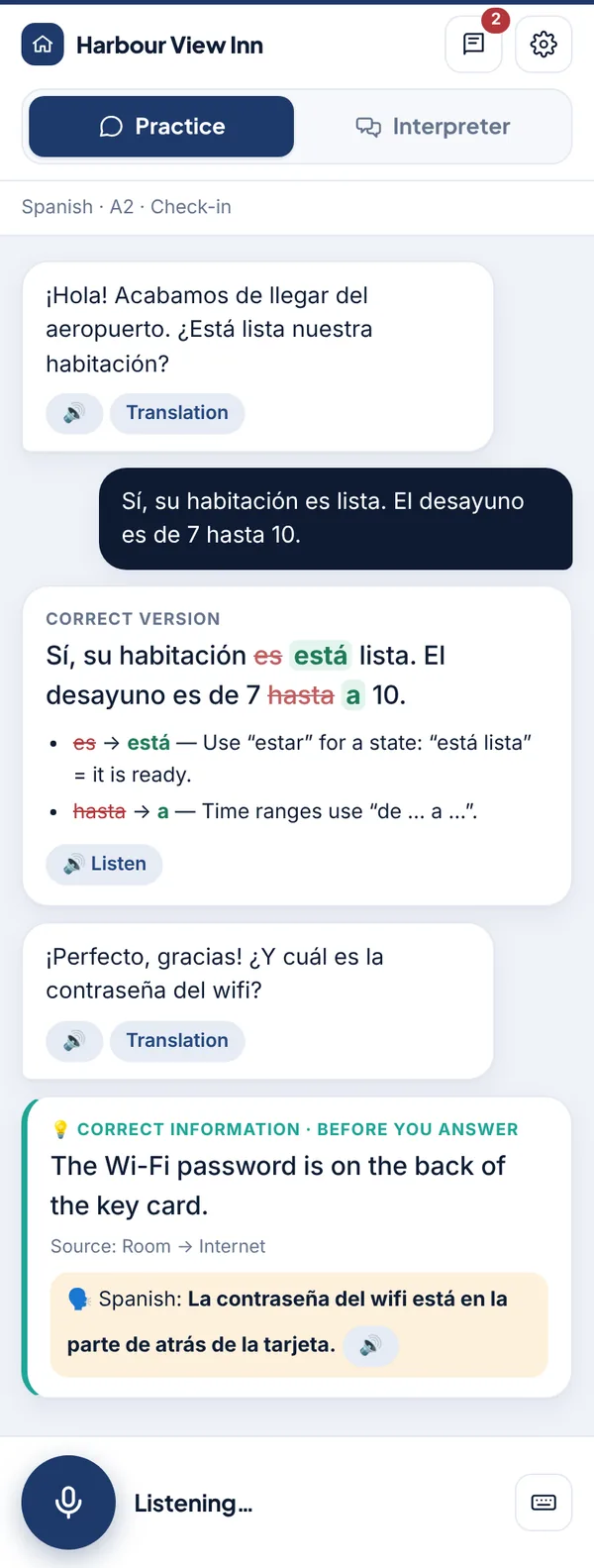
- Language practice with real hotel dialogues. In check-in, early arrival, complaint, check-out, restaurant, transfer, housekeeping and campsite scenarios, the AI plays the guest; every sentence your staff say is corrected and read back correctly, then the conversation continues.
The Staff Interpreter is part of the Pro plan and opens from your AIroomier panel with one tap. There is nothing to install; it runs in the phone's browser.
How the interpreter works
- A staff member taps Staff Interpreter in the AIroomier panel. The interpreter opens on the phone; the session lasts 12 hours, no password needed.
- On the Interpreter tab they choose the guest's language and tap the microphone once.
- Before the first sentence, a short notice appears in the guest's language: the conversation is translated by AI services and the audio is not recorded. If the guest taps Yes, the conversation starts.
- The phone sits between the staff member and the guest. Whoever speaks, the app recognizes the language, translates into the other one and reads it aloud. Nobody presses a button; a short pause at the end of a sentence is enough.
- While the app is speaking, the microphone does not listen, so it never tries to translate itself. When it finishes, it listens again.
In a noisy lobby or for very short phrases, staff can also type. When a new guest arrives, New guest resets the notice and the conversation history.
When a guest asks something: a suggested answer from verified information
Translation only carries the words; giving the guest the right information is still up to your staff. A new colleague on the night shift may not know when the spa opens or what the airport transfer costs.
While translating the guest's question, the Staff Interpreter also checks your panel: business information, facilities, extra services and their prices, and your Knowledge Base. If the answer is recorded, a Suggested answer · verified information card appears on the staff screen:
- The answer is written in the staff member's language, with the place in your panel it came from.
- Read to guest in … (for example Read to guest in Spanish) reads it aloud in the guest's language.
- If they'd rather answer in their own words, I'll say it myself closes the card.
If the information isn't recorded, the card clearly says This information is not recorded and tells staff not to guess but to ask a manager. The question is added to Knowledge Base → Missing Topics in your panel as a short topic without personal details. Once you fill it in, both the interpreter and your guest-chat assistant use it.
For availability and price questions the interpreter gives no figures; it reminds staff to check the booking screen. Prices and availability change by the day, so it doesn't guess.
When a guest needs something: the request reaches your panel
When a guest asks for a service or reports a problem, the interpreter recognizes it and prepares a request card: a short summary, the department (housekeeping, maintenance, food & beverage, concierge, guest relations) and the room number if one was mentioned.
When staff tap Send to panel, the request opens on your Guest Requests board. If the room number matches a room in your panel, it's linked to that room, and the request follows your assignment and notification settings. Emergencies open as urgent. The guest who asked for towels no longer depends on someone at the desk remembering; it becomes a task your team can follow.
Practice mode: learning a language with real hotel conversations
To help your team's language skills grow over time, the same app has a Practice tab. The AI plays the guest and your staff answer:
- Scenarios come from hospitality itself. Check-in; early arrival and a room that isn't ready; a complaint; check-out, payment and taxi; restaurant and bar; transfers and tours; towels, pillows and a broken air conditioner; campsite and glamping. Scenarios built from your own property information appear in the list too.
- Every sentence is corrected. The corrected version appears with the changed words highlighted, and each mistake gets a short explanation in the staff member's own language. The correct sentence is read aloud; staff can repeat it, then the conversation picks up where it left off.
- You choose how strict it is. Level (A1–C1) and correction strictness can be adjusted: a beginner can work only on mistakes that change the meaning, an advanced speaker can get suggestions for sounding more natural.
- If the guest asks about the hotel, staff see the verified information and an example sentence in the target language before answering, so they learn your real information while they practice.
- Notebook. Mistakes are saved in a notebook on the phone, so staff can review them in the evening or between shifts.
Practice works just as well for Turkish-speaking staff learning English, German or Russian as it does for staff abroad learning Turkish. All 17 supported languages are available for practice.
For properties outside Turkey too
The Staff Interpreter isn't only for properties in Turkey. The staff language follows the country of the property: at a hotel in Germany the app opens in German and translates German–Turkish for a Turkish guest, and the notice shown to the guest is written for the property's region. The app's own screens are available in English, Turkish and German.
Privacy
- Audio is not recorded. Speech is turned into text and processed for translation; no audio file is kept.
- Conversations are not stored on the server. What staff said themselves stays only on that phone, for their evening practice.
- The guest is told first. Before the first sentence the guest sees, in their own language, that the conversation is processed by AI services; if they tap No, translation doesn't start.
- Only what's needed reaches your panel. A short summary and room number on a request card; a topic without personal details on the missing-topics list.
What it doesn't do
To be honest about it:
- It doesn't replace a certified interpreter. Where a misunderstanding could have serious consequences, such as health, legal matters or contracts, use a professional interpreter.
- It needs an internet connection. Recognition and translation run in the cloud.
- Very noisy places can be hard. In a crowded lobby, keep the phone close to whoever is speaking or type instead.
- It can make mistakes. That's why both languages are always on screen: staff always see what the guest said and what they said themselves.
- It doesn't quote prices or availability. Staff check the booking screen for those.
How is it different from the guest-chat assistant?
Mira, the AI receptionist in AIroomier, talks to guests in writing on your website and room QR codes, including when no one is at the desk. The Staff Interpreter is for face-to-face conversations: the guest is right there with your staff at the desk, in the restaurant or at the room door. Both use the same property information; anything you add for one is used by the other.
Price and usage
The Staff Interpreter is included in the Pro plan, with 2,000 turns a month. A turn is one translation or one corrected practice sentence. Usage is shown in your panel, with a warning as you approach the limit. For founding members, Pro is free until 30 April 2027.
FAQ
Do we need to install an app?
No. The Staff Interpreter runs in the phone's browser. Tap Staff Interpreter in the AIroomier panel; you can add it to the home screen like an app if you like.
Does it really work without pressing a button?
Yes. Once the microphone is on, the app detects when someone starts and stops speaking. Staff and guest take turns; translation and read-aloud happen on their own.
Which languages are supported?
Turkish, English, German, Russian, Arabic, French, Spanish, Italian, Polish, Ukrainian, Dutch, Romanian, Czech, Slovak, Lithuanian, Danish and Persian. Answers in Cyrillic or Arabic script also show a Latin-letter pronunciation staff can read out.
Could it give a guest the wrong information?
Suggested answers are built only from the information in your panel and show their source. If something isn't recorded, the app doesn't guess: it says "not recorded" and adds the question to your missing topics. The translation itself is done by AI and can make mistakes, which is why both languages are always on screen.
Are conversations recorded?
Audio is not recorded and conversations are not stored on the server. The guest is informed in their own language before the conversation starts. Only the request summaries staff choose to send and missing topics without personal details reach your panel.
How many staff can use it?
Team members with access to your panel can open the interpreter. The allowance is 2,000 turns per property per month, shared by all staff.
Is it in the Basic plan?
No, the Staff Interpreter is part of Pro. Properties on Basic see an introduction screen in the panel and can start using it as soon as they upgrade.