
Last updated: 1 November 2026
What is an AI receptionist?
An AI receptionist, also called an AI hotel receptionist or virtual receptionist, is a chat assistant that works on a hotel's website or through a guest link. Guests type their question in their own words; the assistant understands it and replies with the property's own information.
It differs from a classic chatbot in three ways. It doesn't make guests click through menus, it understands free-form questions, and it speaks several languages. It also reads changing information, such as availability and prices, straight from the property's own system.
At AIroomier, this assistant is called Mira. Mira follows one rule: she only uses the information you enter in your dashboard. If a guest asks something your dashboard doesn't cover, she doesn't guess.
What does an AI receptionist do?
- Answers common questions. Check-in and check-out times, breakfast, parking, the pool, pets, cancellation terms, payment methods and the weather are answered in seconds. The Wi-Fi password is only shared with guests who are staying with you.
- Shows availability and prices. Mira understands dates like "2 adults, 14–17 June" and lists the matching room types with prices. Your last-minute, early-booking and long-stay discounts are applied automatically.
- Collects booking requests. Mira gathers the guest's name, phone number, email and consent to data processing inside the chat. The request lands in your dashboard and your inbox, and you confirm the booking.
- Suggests extra services. Airport transfers, boat trips or a breakfast basket: Mira describes your paid services with their prices and suggests them at the right moment.
- Picks up requests during the stay. Messages like "could we get extra towels?" or "the air conditioning isn't working" become cards on your team's request board.
- Speaks four languages. Mira chats with guests in English, Turkish, German and Russian, and understands the question even when a guest writes in another language.
- Says when she doesn't know. If the answer isn't in your dashboard, Mira points the guest to your team with call, WhatsApp and email buttons. You see the question in the "Missing Topics" list; once you add the answer, Mira knows it next time.
For the details, see the How Mira Works guide.
What it can't do
Knowing the limits of an AI receptionist is the easiest way to start with the right expectations. Mira:
- Doesn't confirm bookings on her own. She collects the request; confirming availability and taking payment stay with you.
- Doesn't answer the phone. Mira works in writing: the chat window on your website, the guest link, room QR codes and your page on airoomier.com.
- Doesn't guess information that isn't in your dashboard. The more complete your details, the better her answers.
- Isn't an emergency line. Make sure guests know your reception or security phone number for emergencies.
- Isn't a channel manager. Mira reads availability from your AIroomier calendar. For now, bookings from channels like Booking.com are added to the dashboard manually, and Mira takes them into account.
How it works
- Create your account. After signing up, a 3-step setup wizard guides you.
- Add your details. Enter check-in times, policies and contact details, or import them from your website. Imported details arrive as drafts for you to approve.
- Add room types and prices. Set up your rooms, pitches and seasonal rates.
- Put Mira live. Add one line of code to your website, share the guest link, or use your free page on airoomier.com.
- Review and improve. Read every conversation in the dashboard. Mira checks her own answers automatically, and weak ones show up on the Chat Quality page.
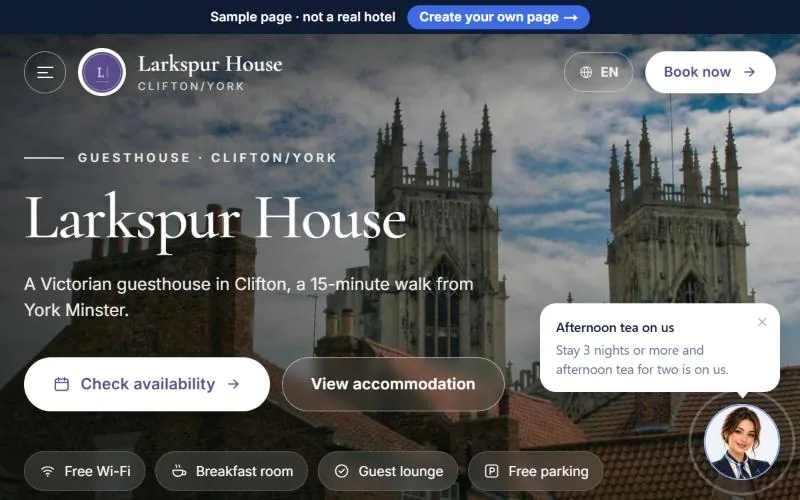
Who is it for?
- Boutique hotels and guesthouses: properties with 5–40 rooms and no night reception, where most questions arrive in the evening and at night.
- Holiday apartments and villas: owners who run other businesses too and can't reply to every message straight away.
- Campsites, glamping and caravan parks: places that need to explain rental tents or bungalows separately from pitches for guests' own caravans.
- Properties with many international guests: anyone who wants to answer German and Russian messages as quickly as English ones.
For large hotel chains that require their own booking engine and a channel manager integration, it isn't the right tool yet. Independent hotels will find the details on the Hotels page.
Night receptionist vs. classic chatbot vs. AI receptionist
| Night receptionist | Classic chatbot | AI receptionist (Mira) | |
|---|---|---|---|
| Hours | Depends on shifts | 24/7 | 24/7 |
| Languages | Whatever staff speak | Usually one | English, Turkish, German, Russian |
| How guests ask | Freely | By choosing from a menu | Freely, in their own words |
| Availability and prices | By checking the system | Usually not | Live from your dashboard, discounts included |
| Bookings | Takes them | Links to a form | Collects the request in chat, you confirm |
| Unknown questions | Looks it up | "I didn't understand" | Says so, hands over to your team, tells you |
| Phone | Answers it | No | No, works in writing |
| Face-to-face welcome | Yes | No | No |
Mira doesn't replace your receptionist. She takes on the questions that come up every day, so your team has more time for guests in person. For a detailed comparison of five options, including WhatsApp auto-replies and general AI chat, see AI receptionist vs chatbot.
How much does it cost?
- Basic: free forever. 100 AI conversations a month, 4 room types, 10 confirmed bookings a month and a free page on airoomier.com.
- Pro: €49 a month or €490 a year. 1,000 AI conversations a month, your own assistant name and photo, brand colors, discount rules and advanced analytics.
- Founding Member: properties that join by 30 April 2027 use Pro free until that date, then pay €290 a year.
No commission on bookings and no credit card needed. See the pricing section for every detail.